
On the Spooky2 Forum, John White has recently introduced a better form of substance emulation than the current Molecular Weight programs that are in the Spooky2 program database. These new programs require that multiple frequencies be run simultaneously, which, if the number of frequencies is higher than two, this can’t be done on a single Spooky2 generator. With the Spooky solution, these frequencies can be imprinted onto holographic stickers, and then you wear the sticker, and you will get all the frequencies at the same time.
Another way to receive multiple frequencies at the same time is via audio files. These files can be played through speakers, or the signal can be sent to the Spooky2 PEMF coils or the Spooky2 Remove if you have the right cabling to convert an audio headphone plug to a connector necessary for those devices. Some of the Spoooky-related products — the Spooky2 Harmony attachment for Spooky2 Scalar, or the Miramate Magic Pro — can accept audio input.
These new programs/frequency sets are available on the Spooky2 Forum.
JW Drugs
The online tool we are going to use to create the audio is documented here: Create a Frequency Set. Inside this documentation is a link to the actual tool.
The substance we are going to emulate is Dihydrotestosterone.
The relevant information from the NAD+ post are the frequencies: 396412991361215.00,451794218095502.00,
Here is what the Create Frequency Set tool looks like with the entries needed to create an optimal audio that you will most likely be able to hear. The explanations of the choices are given later.
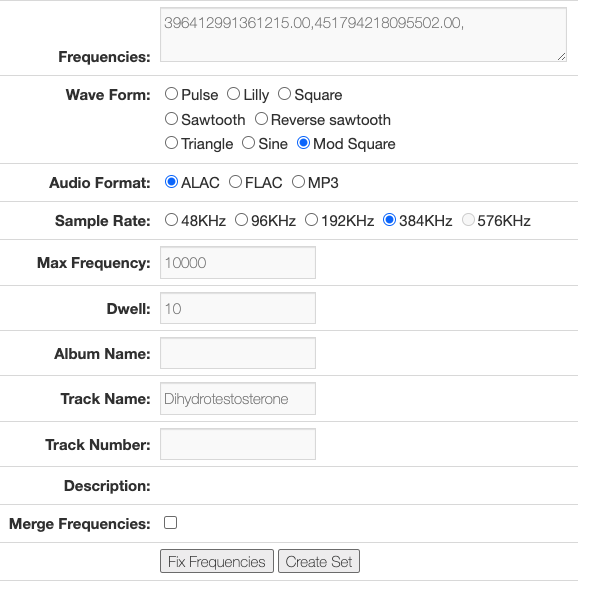
The Frequencies are copied and pasted from the JW Substance program on the Spooky2 forum.
The Wave Form for these very high frequencies that is the most optimal is the Mod Square. This is a waveform recommended by Johannes D. on the Spooky2 forum that is a -100% offset 62.5% duty Square wave.
The Audio Format and Sample Rate are your choice. If you want to use higher frequencies, even higher than is audible, use the FLAC format with the 576 kHz sample rate. The higher the frequency, the more power the signal will have at the super high harmonics.
The Max Frequency you use depends on what you want. For most power, use 20000 or even higher. If you leave this field empty, the highest frequency will be chosen for the Sample Rate you are using, which, for the Mod Square waveform, is Sample Rate/8. But if you want to hear the frequency, you might choose 10000, as most adults can hear up to 10 KHz. If you want a pleasant listening experience, I suggest using 512.
The Dwell is set to 10 seconds. Since you are going to repeat these audio on your player, this time does not have to be very long.
The Track Name is set to the program name, which in this case is NAD+. This will allow you to see the name of the substance in your audio player.
The Merge Frequencies checkbox must be ticked to merge all the frequencies.
Now, click Create Set. In a moment, a file will start downloading. Find this zip file in your Downloads folder, open it, and copy the audio file out of the zip file. When you play this file, be sure to choose the looping option on your player.